Manual Installation for HaramBlur
We’re sorry that our add-on is no longer available on the Mozilla Add-ons Store. However, you can still install it manually using the `.xpi` file provided below. Follow the steps to get started!
How to Install the Add-on
- Download the `.xpi` file: Click the button below to download the latest version of HaramBlur.
- Open Firefox: Launch your Firefox browser.
- Access Add-ons Manager: Type
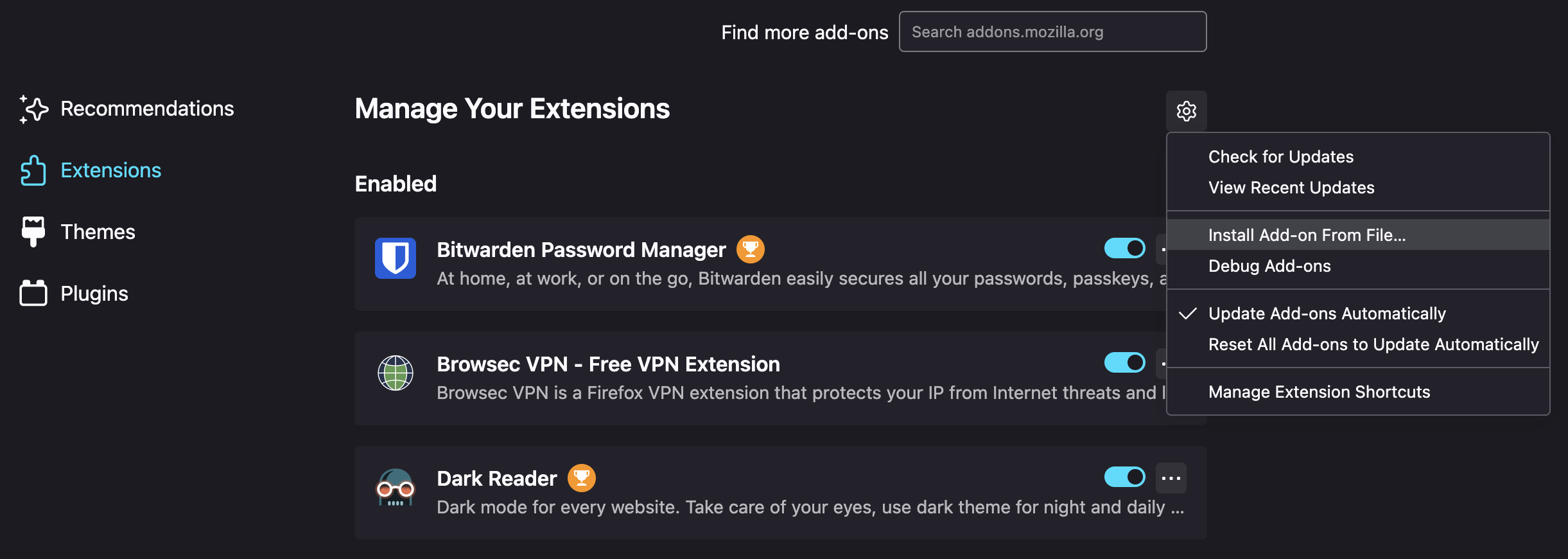
about:addonsin the address bar and press Enter, or go to "Add-ons and Themes" from the menu. - Install the Add-on: Click the gear icon at the top of the Add-ons Manager, then select "Install Add-on From File." Locate and select the downloaded `.xpi` file.
- Confirm Installation: Firefox will prompt you to confirm the installation. Click "Add" and wait for the process to complete.
- Enjoy! Once installed, HaramBlur will be ready to use.